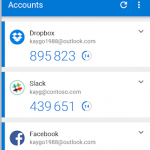
Two-Factor authentication greatly improves online security.
This example will show how to setup 2FA for PayPal.
Can also use for Facebook, GMail and Microsoft accounts. eBay 2F2 can be setup via eBay app.
Step 1.
Install “Microsoft Authenicator” app onto mobile phone or tablet. ***iPhone – Add via App Store, Android via Play Store.
Step 2.
Go to PayPal website on laptop or PC and sign into the website with PayPal username & password. Go to Settings cog in top corner Go to “Security” menu TAB “2-step verification” – Select “Update” Select “Use an authenticator app”, then “Set it up” A QR barcode will appear on the screen. Grab your mobile phone or tablet.
Step 3.
Open “Microsoft Authenicator” app and select three dots in top corner and “Add Account” Select “Other account” (Google, Facebook, etc) Use mobile phone to scan QR barcode on laptop. Account has been added successfully. Open and you will see a six digit code. Type this six digit code into Step 2. on laptop and click “Confirm” to finish set up.Click “Done” to exit.

Step 4.
Now on your laptop or PC when signing into PayPal, will need to enter username & password as normal. You will also need to enter a six digit code from Microsoft Authenicator on mobile phone. Also note the timer countdown. Wait until more than 10 seconds or it will change.
If you need any further help, give us a call on 08 7200 3883 or 0432 443 682 and our technicians will be happy to help at competitive pricing.